

When you need a quick answer from a specific person, instant messaging or even talking to them is sometimes the best solution. To make it easy to contact people, Socialtext provides integration with Skype, AOL Instant Messenger, and Yahoo Instant Messenger. For example, you can see a person’s Skype, AIM, or Yahoo Messenger status on their Socialtext profile, then click to begin a chat session.
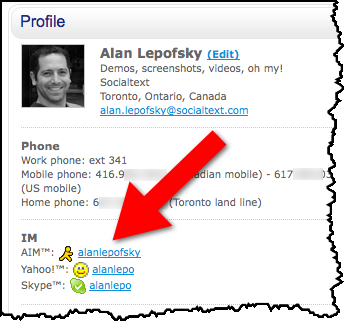
There are several other integration points which I will explain below, but I want to point out that often the conversations you are having via chat could serve a broader audience if you held them openly via microblogging with Socialtext Signals.
Say you have a question about an upcoming conference. You could send a Skype message directly to the VP of Marketing, wait for them to respond, hopefully get your answer, and be done. Or, you could post the same question to the Marketing Group in Signals, providing the opportunity for all members of the group to be involved in the conversation, rather than relying on just the VP. Also, content in Signals is searchable, so if someone else has the same question, they may be able to find the answer without asking, which they could not if the conversation was locked away in email or chat history.
Anyway, here are other places in Socialtext that instant messaging integration is available.
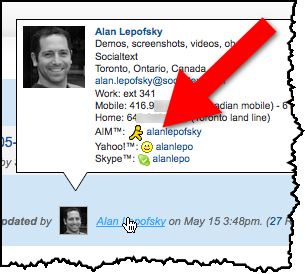
When you hover your mouse over a person’s name or photo, their business card is displayed, including their online status.
You can also add Skype links to any Socialtext wiki page using the insert menu.
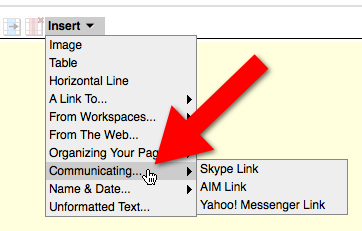
Including SocialCalc spreadsheet pages.

As you can see, Socialtext provides you with several choices on how to communicate with your colleagues. However, if you’re a long time chat user who has not yet started using microblogging, I suggest you give using Signals a try. I think you’ll quickly start to see the benefits of holding more open conversations.




 Follow us on Twitter
 Follow us on Facebook
 Join our Google+ Circle
 Subscribe to our blog
 Subscribe to our newsletter
 Watch us on YouTube