

Quick, can you tell me what’s happening at your company right now?
- Do you know where your colleagues are, and what they are working on?
- Do you know what conversations are going on, or updates are being made to your content?
- Do you know what content has been worked on the most in the last week, and who the most active contributors were?
If you’re still communicating primarily via email, storing files in shared folders, and relying on manually created status reports and meetings to find out what is going on, then the answers are most likely no. But if you’re using Socialtext, you would know all of these things, and more.
Activity Streams Keep You Informed
Email is limited by design. The messages displayed in your inbox are restricted to only the conversations that you are directly involved in. That means you can’t gain insight from all the other conversations taking place in your company, nor interact with all the other people.
Compare that to Socialtext’s activity streams, were you can view all the events taking place, and follow updates from people all across your company. You can see when edits, comments, or tags are made to Socialtext pages. You can see when people update their profiles, share links to news, or add people to their social network. Developers can also extend the list of activities to include events from your company’s other business systems, by using Socialtext’s robust programming interfaces.
Monitor Activities On Your Dashboard
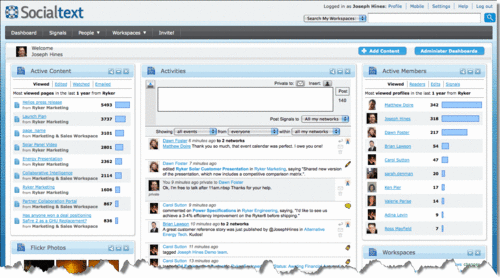
Starting with Socialtext release 3.6, three new widgets are available on your Socialtext Dashboard, Activities, Active Content, and Active Members.
The improved Socialtext Dashboard (click to enlarge)
Activities
Socialtext’s Activity Streams have been designed with the following Enterprise-grade requirements in mind:
- Multiple Content Types: The Activities widget has been designed to be the one place people go to see all the updates happening inside your company. It displays information from events taking place in Socialtext workspaces, messages from Socialtext Signals, and can be extended to show events from other 3rd party systems.
- Security: Access controls ensure that you can only see the updates that you have access to. So even if you are following someone, if they update a page in a workspace that you don’t have access to, you will not see that in the stream.
- Filtering: You can easily customize the stream to display a subset of information, by filtering the type of events shown (label #2 in the image below) and who they are from (label #3)
The Activities Widget (click to enlarge)

For example:
- If you just want to see the Signals from the people you follow, you can do that. This helps you keep up with where your colleagues are, what they are doing, and things they are sharing such as news items or links to information. You can also post Signals (label #1), enabling you to share status updates, ask or answer questions, share links, etc. Also new to 3.6, you can now delete Signals you have sent in error. (label #4)
- If you want to see just the updates (edits, comments, tags) being made to pages you’re working on, you can do that. This helps ensure you’re always looking at the most recent version of content. No more digging through your inbox or file system to try and find the latest presentation of spreadsheet.
- If you want to see everything from everybody, you can do that too! There is tremendous value in discovering new people, and new content that you’ve never worked with before. If you remain restricted to your inbox, that won’t happen. But with all the events taking place inside Socialtext being broadcast to the Activity stream, you now have a way to find new pages or new colleagues that can help you in your job.
Active Content and Active Members
While activity streams are a great way of keeping up with what is going on now, you won’t always have the time to follow the entire stream. So what you need, is an easy way to quickly discover the most active pages and people. With the Active Content and Active People widgets, that information is available at a glance.
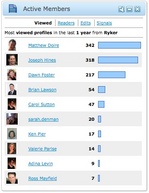 The Active Members widget allows you to see who’s profiles are being viewed the most often, plus who the most active readers, editors, and Signal’ers are.
The Active Content widget, shows you which the most viewed, edited, watched, and emailed pages are.
You can easily configure (from the wrench icon) the source and duration for these widgets, allowing you to customize them to display the information that is most important to you.
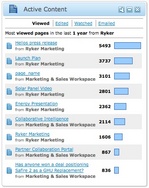 For example, you could:
- Find out which pages have been viewed the most over the last year across all your Socialtext workspaces
- Discover which pages have been edited the most in the last week in your HR workspace
- See who’s read the most pages in your Marketing workspace this month
- Look at who’s sent the most Signals in the last week
We understand that when running a business, you need to know what is going on, and you need to know now. You need to know what people are working on, and make sure you’re looking at the most recent content so you can make informed decisions. So stop being burdened by the overflow of your inbox, and see how Activity Streams and Socialtext Dashboard can help you access the right information and find best people to get the job done.



 Follow us on Twitter
 Follow us on Facebook
 Join our Google+ Circle
 Subscribe to our blog
 Subscribe to our newsletter
 Watch us on YouTube